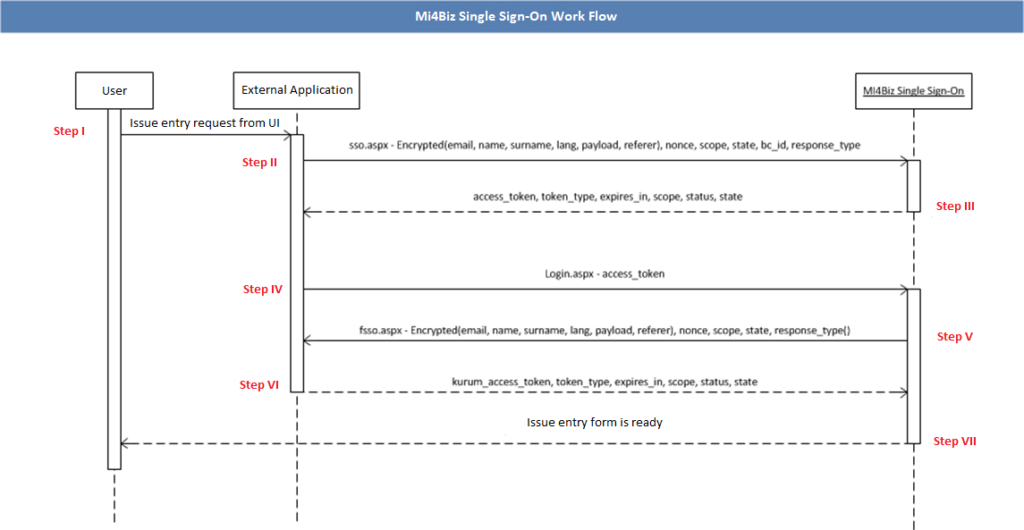
next4biz CSM SSO Workflow Diagram
Below is the sequence diagram for next4biz SSO workflow.
Steps in the Diagram
- The user of the External Application clicks a link or a button to enter an issue.
- The External Application makes a GET request to next4biz sso.aspx page.
- next4biz validates the provided information and returns success or failure messages accordingly. If the provided information is valid, next4biz returns a JSON message that includes access_token and expires_in parameters.
- The External Application redirects the user to next4biz login.aspx with the provided access_token parameter.
- next4biz makes a GET request to the External Application to verify the user has a valid session in the External Application. The format of this GET request is the same with External Application’s GET request to next4biz.
- The External application responds success or failure regarding the validity of the user’s session.
- The user has successfully logged in through SSO and is now at the issue entry form.
The details about the parameters are mentioned later in this section.
Screenshots